- Home
- Square foot gardening app
The square foot gardening app that draws the grid for you
Square foot gardening only works if the spacing is right. Niwa puts a real 1-foot grid over your bed, fills each square with the correct number of plants automatically, and tells you when to sow every one of them based on your own frost dates.
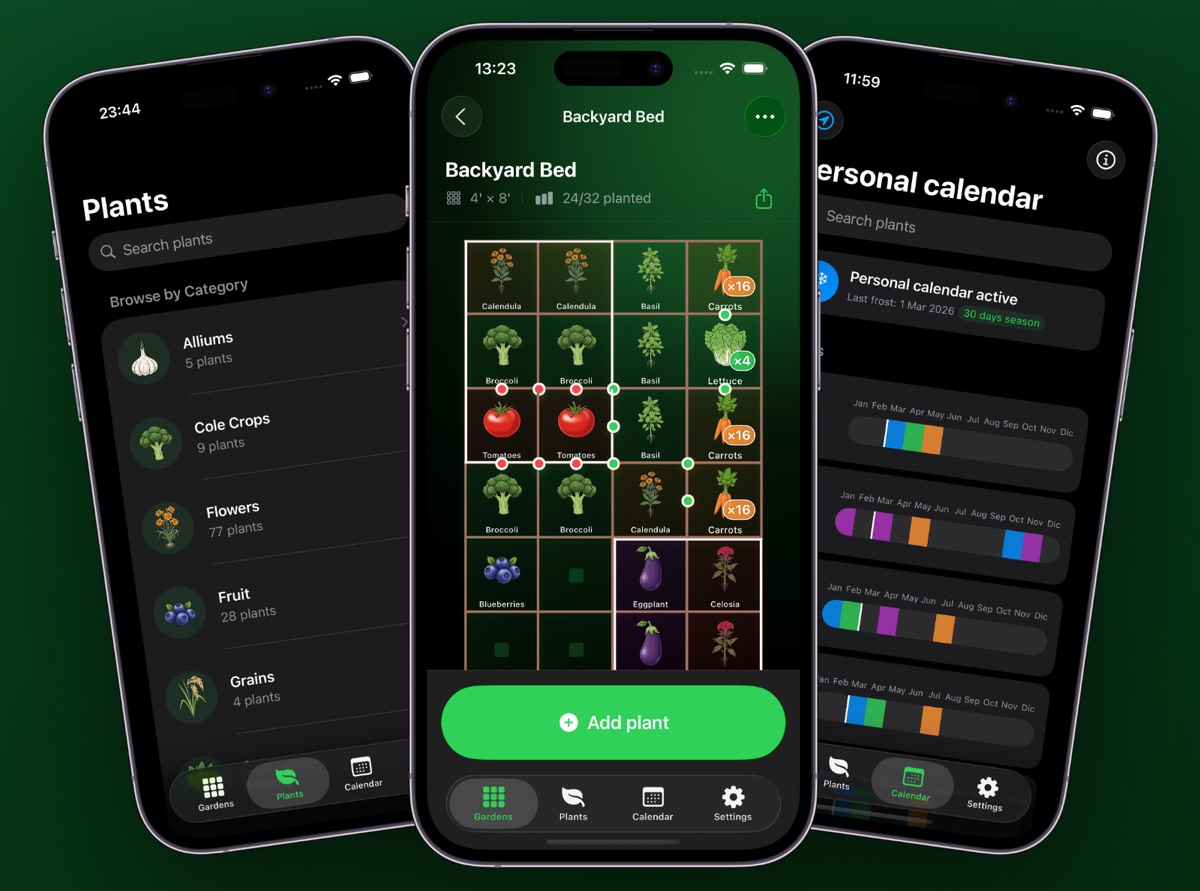
A square foot gardening app is worth using for one reason: it removes the arithmetic. Instead of looking up that carrots need 3-inch spacing, dividing 12 by 3, squaring it and writing “16” in a pencil box, you tap the carrot and the square fills with sixteen. Niwa does that for 200+ crops, then layers on two things a paper grid cannot — a red or green dot between squares that shouldn't or should sit next to each other, and a sowing date for each crop counted back from your local last frost.
What square foot gardening actually demands of a planner
The method, developed by Mel Bartholomew in 1981, replaces long rows with a grid of 1-foot squares. Each square holds a different crop, and the number of plants in that square depends on how much room the crop needs. It is a brilliant system for small beds — and a fiddly one to plan by hand, because every square is a separate small decision.
Four decisions have to happen for every square you fill:
- How many fit? Spacing in inches converts to a count per square.
- Will it shade its neighbours? Tall crops belong on the north side.
- Does it get on with what's next to it? Some pairings help, some don't.
- When does it go in? Which depends on frost, not on the calendar month.
Do that sixteen times for a 4×4 bed and you understand why most people give up and plant whatever the garden centre had in stock. An app earns its place by answering all four as you tap, not by making you look them up.
How Niwa handles each square
1. The grid matches your actual bed
Enter the bed dimensions — 4×4, 4×8, 2×8, a 3×12 border, whatever you built — and Niwa lays a one-foot grid over it. The header shows the size and how full it is, so a 4×8 bed reads 4' × 8' · 24/32 planted. You can build several beds and keep them in separate gardens.
2. Plants-per-square is calculated, not remembered
Tap a square, pick a crop, and Niwa fills it at the correct density and prints the count on the cell — ×16 for carrots, ×4 for leaf lettuce, a single icon for broccoli. The rule underneath is simply 12 inches divided by the crop's spacing, squared:
| Spacing needed | Plants per square foot | Typical crops |
|---|---|---|
| 3 inches | 16 | Carrots, radishes, onions, chives |
| 4 inches | 9 | Spinach, beets, bush beans, garlic, leeks |
| 6 inches | 4 | Leaf lettuce, Swiss chard, small basil, marigold, strawberry |
| 12 inches | 1 | Peppers, parsley, cilantro, okra, large basil |
| 18 inches | 1 per 1–2 squares | Broccoli, cauliflower, cabbage, eggplant, bush tomato |
| 24 inches + | 1 per 2–9 squares | Vining tomato, winter squash, pumpkin, zucchini |
You can run the same maths yourself in the browser with the plants per square foot calculator — it is the identical formula the app uses.
3. Companion conflicts show up on the grid
This is the part a paper grid cannot do. When two crops sit in neighbouring squares, Niwa puts a small dot on the border between them: green where the pairing is beneficial, red where the two are better separated. Basil beside tomatoes goes green. Onions beside beans goes red. You see it at the moment you place the plant, which is the only moment the information is useful.
Why this matters more in square foot beds: in a row garden, incompatible crops are metres apart. In a 4×4 bed, everything is within a foot of everything else, so antagonistic pairings actually interact. Intensive spacing makes companion planting go from a nice-to-have to something worth getting right. See how companion mode works →
4. Every crop gets a date, not a season
Niwa reads your location once, finds your average last spring frost and first autumn frost, and works backwards per crop. Tomatoes get “start indoors 6–8 weeks before last frost”; peas get a direct-sow window that opens weeks earlier. Each plant in the bed appears on a month-by-month timeline with its sowing, transplant and harvest bands, so you can see at a glance which squares are busy in March and which are still empty.
Planning your first bed, step by step
Measure the inside of the bed
Inside dimensions, not outside — the timber does not grow anything. Never build wider than 4 feet if you can only reach it from both sides, or 2 feet if it is against a wall.
Place the tall crops first, on the north edge
Tomatoes, trellised cucumbers, corn and pole beans cast shade. Put them in before anything else so the shading decision is already made. In the southern hemisphere, reverse it.
Fill the big single-square crops next
Broccoli, cabbage, peppers, eggplant. These are 1-per-square or larger and they dictate how much room is left. Watch for red dots as you go — brassicas next to nightshades is a common accidental clash.
Backfill with the dense fast crops
Radishes, carrots, lettuce, spinach. These are your 9s and 16s, and they are also your succession crops: whatever empties first gets replanted mid-season.
Check the calendar tab before you buy seed
Now the bed is full, the calendar shows what needs starting indoors and when. Buy from that list rather than from the seed rack — it is the step that stops you owning nine packets of courgette.
A worked 4×4 layout
Sixteen squares, planned north-to-south, no red dots:
| Row (N→S) | Square 1 | Square 2 | Square 3 | Square 4 |
|---|---|---|---|---|
| North | Tomato ×1 | Tomato ×1 | Basil ×4 | Pepper ×1 |
| 2nd | Cucumber ×2 | Lettuce ×4 | Lettuce ×4 | Spinach ×9 |
| 3rd | Bush beans ×9 | Bush beans ×9 | Beets ×9 | Parsley ×1 |
| South | Radish ×16 | Carrot ×16 | Carrot ×16 | Marigold ×4 |
That is 106 plants in sixteen square feet. Basil sits with the tomatoes deliberately; marigold goes in the corner as a pest deterrent; the onion family is left out entirely because beans and alliums antagonise each other and beans occupy two squares here.
What Niwa does not do
Worth saying plainly, because it may rule the app out for you:
- iPhone only. iOS 18 or later. No Android, no iPad-optimised layout, no web version.
- No cloud sync. Plans live on the device. That is deliberate — no account, no server — but it means no sharing a plan across two phones.
- Not a plant identifier. It plans and schedules; it does not diagnose photos of sick leaves.
New to the method?
If you have not built the bed yet, start with the method rather than the app. Our complete square foot gardening guide covers Mel's Mix soil recipe, grid construction, succession planting and crop rotation, with a spacing chart for 30+ crops. Then come back and lay it out in twenty minutes.
Stop counting squares on graph paper.
Niwa draws the grid, does the spacing maths, and dates every crop from your own frost. Free on iPhone.

Questions gardeners ask
What is the best app for square foot gardening?
The right app for square foot gardening needs three things: a true 1-foot grid you can size to your bed, automatic plants-per-square counts so you are not looking up a spacing chart every time, and planting dates tied to your own frost rather than a generic zone. Niwa does all three on iPhone and works offline. From Seed to Spoon and Planter are the closest free alternatives, and the Almanac Garden Planner is the strongest desktop option.
Compare the main square foot plannersCan I use a square foot gardening app on an existing raised bed?
Yes. Measure the inside dimensions of the bed in feet, enter them, and the grid is drawn to match. A bed that is not a whole number of feet — say 3.5 by 7 — still works; you simply have partial squares along one edge, which are useful for herbs and lettuce.
Raised bed plannerIs Niwa free to use?
Yes. Niwa is free to download from the App Store, and the core planner — the garden grid, the plant library and the planting calendar — works without paying. Optional in-app purchases unlock additional features.
See it on the App StoreHow many plants fit in one square foot?
It depends on the crop's spacing requirement. A plant needing 3 inches fits 16 per square foot, 4 inches fits 9, 6 inches fits 4, and 12 inches fits 1. Large plants such as vining tomatoes or zucchini need more than one square each. Niwa works this out for you and prints the count straight onto the grid cell.
Plants per square foot calculatorCan Niwa plan a raised bed of any size?
Yes. You set the bed dimensions — 4×4, 4×8, 2×8 or a custom size — and Niwa draws the square foot grid to match. You can keep several beds and several gardens in the app at once and switch between them.
Raised bed plannerHow does Niwa know when I should plant?
Niwa uses your location to find your average last spring frost and first autumn frost, then works backwards from those dates for every crop in your bed. Each plant gets its own sow-indoors, transplant and harvest window on a month-by-month timeline, so the dates are yours rather than a generic zone table.
How the planting calendar worksDoes Niwa warn me about bad companion plants?
Yes. As you place plants on the grid, Niwa puts a green dot between neighbouring squares that benefit each other and a red dot between squares that are better kept apart, so you see the conflict while you are still planning.
Companion planting in NiwaHow much soil do I need to fill a raised bed?
Multiply length × width × depth in feet to get cubic feet, then divide by 27 for cubic yards. A 4×8 bed at 12 inches deep needs 32 cubic feet, roughly 1.2 cubic yards or sixteen 2-cubic-foot bags.
Raised bed soil calculatorDoes Niwa work offline, and do I need an account?
The whole plant library and all your layouts are stored on the device, so the app works with no signal — useful on an allotment. There is no account to create and your garden data is never uploaded to a server.
See what's includedWhich growing zones and countries does Niwa support?
Niwa works worldwide. It recognises USDA hardiness zones in the United States and derives frost dates from your location elsewhere, including the UK, Canada, Australia and Europe.
Find your frost dates and zoneHow is Niwa different from other garden planner apps?
Three things: it is a native iPhone app rather than a desktop planner viewed in a mobile browser, it shows companion-planting conflicts on the grid as you place plants instead of in a separate chart, and it works fully offline with no account.
Compare Niwa with other plannersIs Niwa available on Android?
Not yet. Niwa is a native iPhone app and needs iOS 18.0 or later. An Android version is not currently available.
Read the gardening guides in the meantime