 Niwa
NiwaBest garden planner apps for iPhone in 2026
Five apps worth your time, what each actually costs, and the one question that decides between them: do you need your plan in the garden, or at a desk?
There are two kinds of garden planner, and picking the wrong kind is the reason most people abandon one. Web planners are powerful and live at a desk. Native apps are with you in the bed, where the actual decisions get made. Almost everything else is detail.
Worth saying plainly: this list is published by Niwa, and Niwa is first on it. We have put our own reasoning, our own price and our own limitations in writing, including a section on when not to choose us. Every price below was checked in August 2026. Check them yourself before you pay, because they move.
What actually separates these apps
Feature lists all look identical. Five things genuinely change your experience:
- Does it work without a connection? The moment you most want a planner is standing over a bed, often with one bar of signal. A web app is unavailable exactly then.
- Does the free tier do real work? Some free tiers plan a garden. Others let you place three plants and then ask for a card.
- Does it draw a square foot grid? If you grow in raised beds, automatic spacing is the single biggest time saver on offer.
- Does it use your frost dates or just your zone? Zone alone cannot produce a planting date. Tools that ask only for a zone are guessing.
- What happens when you stop paying? With a server-side planner, you usually lose the plan, which is also your record for next year's rotation.
The five garden planner apps compared
| App | Platform | Free tier | Paid | Offline |
|---|---|---|---|---|
| Niwa | iPhone | Full planning | $19.99/yr or $34.99 once | Yes, fully |
| Planter | iPhone, Android, web | Limited | From $4.99/mo or $24.99/yr | Partly |
| Almanac Garden Planner | Web | 7 day trial | Around $30 to $35/yr | No |
| VegPlotter | Web | Under 10 beds | Around $25/yr | No |
| From Seed to Spoon | iPhone, Android, web | Generous | Optional upgrades | Partly |
1. Niwa
Best for planning in the garden, on an iPhone.
Niwa is a native iOS app rather than a website in a wrapper, and the whole design follows from that. The plant library ships inside the app, which is why the download is 138 MB and why searching a crop in airplane mode returns instantly. Your layouts, calendar, diary and seed inventory live on the device. There is no account to create.
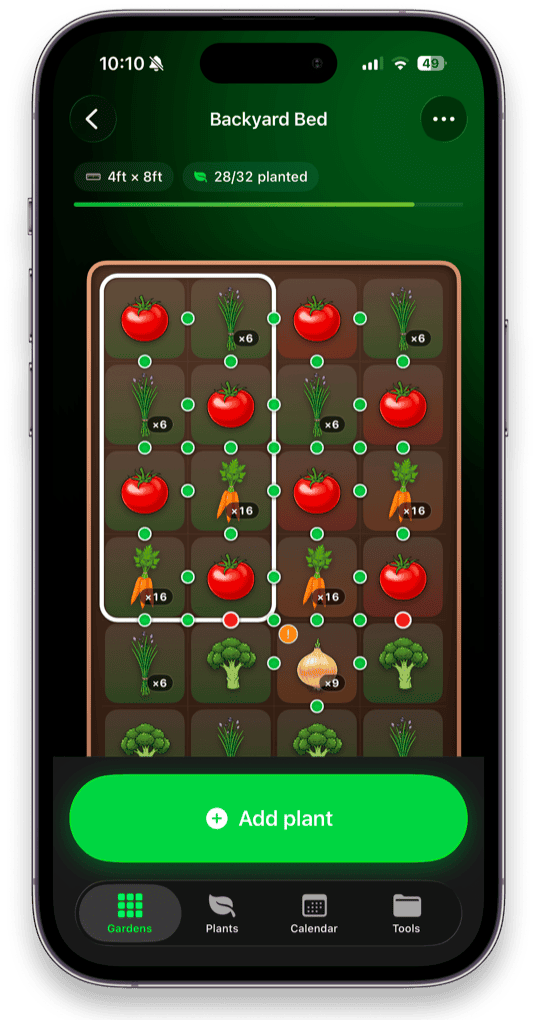
You enter a bed size and it draws the one foot grid, then applies square foot densities of 1, 4, 9 or 16 automatically as you drop crops in. Your location becomes a grow zone and a pair of frost dates, and every one of the 200+ plants gets a personal sow, transplant and harvest window from them. Each plant carries eight reference sections, running from seeding and cultivation through to harvest, storage and nutritional value.
The feature no other planner has is per square crop rotation. Every square remembers which plant family grew in it and in which year, and warns you before a family returns too soon, naming the year the ground is clear again. It knows radishes are brassicas and that alliums need the longest gap of any crop.
| Price | Free. Premium $19.99/yr or $34.99 once, for lifetime access |
| Platform | iPhone, iOS 18 or later |
| Strengths | Fully offline, no account, no ads or tracking, crop rotation memory, Lock Screen widget, usable free tier |
| Weaknesses | iPhone only, no web version or cross device sync, no plant identification, 200+ plants rather than thousands of named varieties |
Its lifetime price is also the lowest of any paid option here, at $34.99 against Planter's lifetime tiers, which run from $49.99 upward.
2. Planter
Best if you need Android and iPhone.
Planter is the closest direct competitor and the strongest choice if your household is not all on iPhone. It runs on iOS, Android and the web, draws a square foot gardening grid, shows companion and combative information on the grid, and carries a large variety database with the option to add custom plants.
The catch is the paywall. Creating gardens is quite limited without a subscription, so the free tier functions closer to a trial. Pricing runs from $4.99 a month or $24.99 a year, with legacy annual pricing at $11.99 for older accounts, and lifetime tiers from $49.99 up to $99.99.
| Price | $4.99/mo, $24.99/yr, lifetime $49.99 to $99.99 |
| Platform | iOS 16.6+, Android, web |
| Strengths | Cross platform, thousands of varieties, custom plants, mature and well reviewed |
| Weaknesses | Limited free tier, subscription led, higher lifetime price |
3. Old Farmer's Almanac Garden Planner
Best for depth of horticultural data.
This is the most established tool in the category and it shows. The plant data is extensive, the spacing calculations are reliable, it handles square foot gardening properly, and it carries the weight of an institution that has been publishing growing advice since 1792. GrowVeg is a very similar web planner in the same style and at a similar price, and is worth a look alongside it.
It is a web application. That means it works beautifully on a laptop in February and not at all in a garden with no signal. It is subscription only after a seven day trial, at roughly $30 to $35 a year, and if you stop paying you lose access to the plan.
| Price | 7 day free trial, then around $30 to $35 a year |
| Platform | Web browser |
| Strengths | Deepest plant data, decades of refinement, excellent spacing engine |
| Weaknesses | Needs a connection and an account, no offline use, no free tier, plan tied to an active subscription |
4. VegPlotter
Best for irregular beds and allotment scale plots.
Most planners assume rectangles. VegPlotter does not, which makes it the pick if your plot is an awkward shape, or if you are working an allotment with a dozen beds of different sizes. It handles flat and raised beds in rectangular, round and irregular shapes, and supports square foot layouts within them.
The free tier is genuinely usable for gardens under ten beds, which is more generous than most. Premium is around $25 a year and unlocks unlimited beds plus features like harvest forecasting. It is web based, so the offline caveat applies.
| Price | Free under 10 beds, premium around $25/yr |
| Platform | Web browser |
| Strengths | Irregular and round beds, good free tier, strong grow guides, handles scale |
| Weaknesses | Web only, no offline use, interface is more utilitarian than polished |
5. From Seed to Spoon
Best free option, and the one with AI advice.
Seed to Spoon is free to a degree the others are not, and it is on iPhone, Android and the web. It offers a visual garden layout, logging for planting details, growth, notes, photos and care events, and an unusual "growing for health" angle that maps crops to common health concerns. Its Growbot chatbot will take a photo of a struggling plant and give advice, which none of the others do.
It is less precise as a spacing and rotation tool than the planners above, so it suits someone who wants growing guidance and light tracking more than an exact bed layout. Seedtime is worth a mention in the same bracket, with a strong free calendar and planning tier.
| Price | Free, with optional upgrades |
| Platform | iOS, Android, web |
| Strengths | Genuinely free, cross platform, AI plant advice, health focused growing info |
| Weaknesses | Less rigorous as a layout and rotation planner, no crop rotation memory |
Which garden apps have an iPhone widget?
If you searched for garden widgets specifically, here is the honest state of things: almost no vegetable garden planner has one.
The iPhone widget space in gardening is dominated by houseplant care apps. Planta builds care schedules from plant type, location and light and reminds you to water, fertilise and repot. Plant Daddy puts watering reminders on the Lock Screen. Happy Plant does the same with a friendlier interface. All of them are excellent, and all of them are about indoor plants in pots, not a vegetable bed outdoors.
For outdoor vegetable growing, the gap is real. A web based planner cannot put a widget on your Lock Screen at all, which rules out the Almanac, GrowVeg and VegPlotter by architecture. Niwa's Lock Screen widget shows upcoming garden tasks, such as watering, germination checks, harvest dates and pruning, drawn from what you actually planted and when.
If you want a widget for indoor plants, use Planta. If you want one tied to a vegetable bed and a planting calendar, the field is very small.
When Niwa is the wrong choice
Four situations where one of the others is a better answer, and it is worth being direct about them:
- You are on Android, or share planning across an Android and an iPhone. Niwa is iPhone only, with no Android version planned. Use Planter or Seed to Spoon.
- You want the plan on a laptop and a phone, synced. Niwa stores everything on one device on purpose, which is what makes it private and offline, and it means no sync. If cross device access matters more than offline access, a web planner wins.
- Your plot is irregular, curved or allotment scale. Niwa is built around rectangular beds on a square foot grid. VegPlotter handles awkward shapes far better.
- You want plant identification from a photo. Niwa does not do it and is not trying to. Use a dedicated identifier alongside whatever planner you pick.
Choosing in one minute
| If this is you | Pick |
|---|---|
| iPhone, raised beds, want it working in the garden | Niwa |
| Mixed Android and iPhone household | Planter |
| Want the deepest plant data, plan at a desk | Almanac Garden Planner |
| Irregular beds or a full allotment | VegPlotter |
| Want free above all, plus AI advice | From Seed to Spoon |
| Refuse to pay a subscription | Niwa, free tier or $34.99 lifetime |
| Need a Lock Screen widget for a vegetable bed | Niwa |
| Need a widget for houseplants | Planta |
The deciding question really is the first one in this guide. If you plan at a desk in winter and rarely consult it afterwards, a web planner is fine and the Almanac's data is hard to beat. If you expect to open it standing over a bed in June with a seed packet in your hand, it has to be a native app that works offline.
More on the offline and subscription question in garden planner apps that work offline, and on getting a first bed laid out in how to plan a vegetable garden layout.